One-touch emergency alerts with live GPS and monitored response
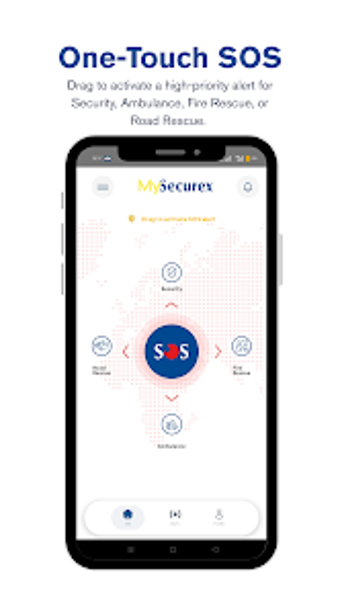
MySecurex puts an emergency workflow on your Android device: drag-to-activate SOS for Security, Ambulance, Fire, or Road Rescue, with real-time GPS sent to a control room. Developed by Securex Agencies for social-communication and safety use, the app pairs One-Touch SOS and automatic alerts to your chosen contacts. It suits individuals, families, and corporate staff who need fast access to professional responders within Securex coverage areas.

Unlock your creativity with Adobe Stock
Get 10 images or 1 video with a free trial
What kinds of emergencies does the app connect you to?
The app covers four discrete emergency types: Security, Ambulance, Fire, and Road Rescue. Each alert type is selectable through the One-Touch SOS interface that uses a drag gesture to trigger a high-priority signal. Once activated, the system notifies the developer's 24/7 Securex Control Room and your pre-defined emergency contacts, enabling responders and personal contacts to receive the same event information.
How private and trackable are your alerts?
Location sharing is explicit and immediate during an alert; the app sends precise GPS coordinates to the Securex Control Room for dispatch. The source material states the control room receives real-time tracking to enable accurate response. The description does not specify end-to-end encryption or data-retention policies, so the app's handling of metadata beyond dispatch is not documented in the provided information.
Is day-to-day use and accidental activation handled well?
The interface includes safeguards for accidental alerts, with a countdown timer and slide-to-cancel mechanism described in the features. The drag-to-activate approach and cancellation option are designed for high-stress situations, and automatic notification of "My People" ensures contacts are informed without extra steps. Onboarding friction and notification granularity for channels beyond emergency contacts are not detailed in the source material.
Does it work across devices and coverage areas?
The app is available for Android and integrates with Securex's regional services, so its practical reach depends on the developer's service area in East Africa. The material emphasises regular updates for compatibility with current mobile operating systems, but it does not list other platforms or cross-device sync mechanisms.
Clear, purpose-built emergency tool for users inside Securex service areas
MySecurex is a purpose-built option for people who need immediate, monitored emergency response tied to a regional control room. Its design prioritizes rapid alerting and contact notification for personal and workplace safety. Users outside the developer's coverage area or those who need multi-platform availability will find the fit limited; consider coverage before relying on it as your primary alarm system.